
Compaq ProLiant ML530 Setup and Installation Guide

Installing Hardware Options 2-39
Compaq Confidential – Need to Know Required
Writer: Tricia Acevedo Project: Compaq ProLiant ML530 Setup and Installation Guide Comments:
Part Number: 139006-002 File Name: c-ch2 Installing Hardware.doc Last Saved On: 6/13/00 12:29 PM
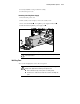
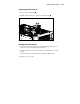
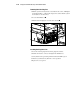
Accessing System Hot-Plug Fans
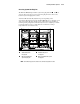
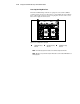
The ProLiant ML530 ships with two system hot-plug fans. Fans and are
closest to the rear of the server. Locate the hot-plug fan to be removed. See
below for system hot-plug fan locations.
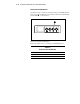
Your fans will automatically adjust their speeds depending on the
environment. Thermal sensors in the ProLiant ML530 server control the speed
of the system fans. The fans should operate at their slowest speed while at
normal operating temperatures. The fans may increase to a higher speed if the
room temperature increases or if the unit is in a rack that is causing a
temperature increase inside the unit.
3 1
4 2
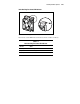
Figure 2-35. Locating system hot-plug fan
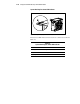
Standard I/O system
hot-plug fan
Standard CPU system
hot-plug fan
Optional redundant I/O
system hot-plug fan
Optional redundant CPU system
hot-plug fan
NOTE: Fan numbering represents actual service numbers assigned to the fans.