
Compaq ProLiant ML530 Setup and Installation Guide

Installing Hardware Options 2-37
Compaq Confidential – Need to Know Required
Writer: Tricia Acevedo Project: Compaq ProLiant ML530 Setup and Installation Guide Comments:
Part Number: 139006-002 File Name: c-ch2 Installing Hardware.doc Last Saved On: 6/13/00 12:29 PM
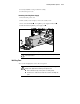
4. You may install the screw provided for security.
5. Connect the power cord.
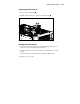
Removing a Hot-Plug Power Supply
1. Disconnect the power cord.
2. If the security screw is in place, remove the security screw.
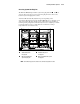
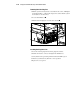
3. Press on the thumb latch , then pull the power supply handle down .
4. Grab the handle and pull the power supply out .
2
3
1
Figure 2-33. Removing a hot-plug power supply
CAUTION: Make sure unused power supply bays contain a blank panel to
ensure proper airflow.
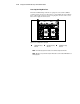
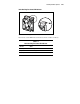
Hot-Plug Fans
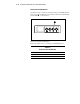
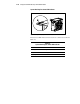
To access the hot-plug fans, remove the access panel.
WARNING: To reduce the risk of personal injury from hazardous energy or
damage to the equipment when working on energized servers:
■ Remove all watches, rings, and any other loose-fitting jewelry.
■ Avoid the use of conductive tools inside the server that could bridge live
parts.