
Compaq ProLiant ML530 Setup and Installation Guide

2-30 Compaq ProLiant ML530 Setup and Installation Guide
Compaq Confidential – Need to Know Required
Writer: Tricia Acevedo Project: Compaq ProLiant ML530 Setup and Installation Guide Comments:
Part Number: 139006-002 File Name: c-ch2 Installing Hardware.doc Last Saved On: 7/18/00 1:45 PM
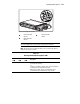
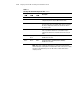
Table 2-2
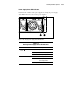
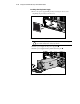
Hot-Plug SCSI Hard Drive Diagnostic LEDs
continued
Activity
LED
Online
LED
Fault
LED
Description
Off Off Amber Failed drive. OK to replace the drive online.
Green Off Off The drive is spinning up or is otherwise being accessed and is not
configured as part of an array. Do NOT remove the drive.
Off Green Off The drive is online and configured as part of an array. OK to
replace the drive online, if a predictive failure alert is received and
the array is configured for fault tolerance and all other drives in
the array are online.
Green Green Off The drive is online and being accessed. OK to replace the drive
online, if a predictive failure alert is received and the array is
configured for fault tolerance and all other drives in the array are
online.
Green Flashing
Green
Off The drive is rebuilding or undergoing capacity expansion.
Do NOT remove the drive.
Flashing
Green
Flashing
Green
Flashing
Amber
The drive is part of an array being selected by the Array
Configuration Utility or upgraded by Options ROMPaq.
Do NOT remove the drive.
NOTE: When a drive configured for fault tolerance is replaced, the replacement drive
automatically begins restoring when it is installed. When a drive is in the process of being
restored, the online LED flashes green. The LED continues to flash until the drive is
completely restored.