
Compaq ProLiant ML530 Setup and Installation Guide

Installing Hardware Options 2-25
Compaq Confidential – Need to Know Required
Writer: Tricia Acevedo Project: Compaq ProLiant ML530 Setup and Installation Guide Comments:
Part Number: 139006-002 File Name: c-ch2 Installing Hardware.doc Last Saved On: 6/13/00 12:29 PM
CAUTION: If Wake-on-LAN is enabled, power off the unit and disconnect the
power cord when inserting or removing expansion cards to eliminate the
possibility of spurious signals on the power management pins. Each PCI slot has
a power management pin that can be used to wake up the system. The NIC that
ships with the ProLiant ML530 server, and other NICs that support the PCI 2.2
specification, can use this pin to turn the unit on when a magic packet arrives.
Wake-on-Lan is disabled by default and can be enabled by using the
configuration utility.
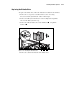
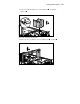
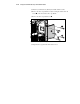
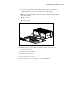
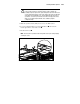
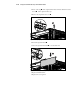
1. With the system board tray fully closed, remove the PCI retainer.
2. To remove the PCI retainer, loosen the thumbscrew and rotate the
retainer up from the center of the server
.
3. Lift the retainer out .
NOTE: The PCI retainer is provided to hold full length PCI cards in place during shipping
or moving the server.
3
2
1
Figure 2-22. Removing PCI retainer