
Compaq ProLiant ML530 Setup and Installation Guide

2-22 Compaq ProLiant ML530 Setup and Installation Guide
Compaq Confidential – Need to Know Required
Writer: Tricia Acevedo Project: Compaq ProLiant ML530 Setup and Installation Guide Comments:
Part Number: 139006-002 File Name: c-ch2 Installing Hardware.doc Last Saved On: 6/13/00 12:29 PM
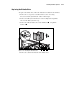
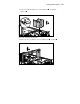
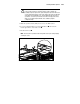
5. Slide the system board tray back by the handle until it catches.
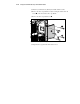
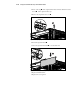
6. Remove the drive cage blank cover by loosening the four Torx T-15
screws
on the front of the drive cage blank.
7. Remove the drive cage blank cover .
1
1
1
1
2
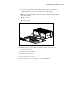
Figure 2-20. Removing the drive cage blank
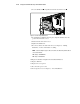
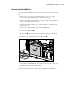
8. Align the drive cage from the front of the server.