
Compaq ProLiant ML530 Setup and Installation Guide

Installing Hardware Options 2-21
Compaq Confidential – Need to Know Required
Writer: Tricia Acevedo Project: Compaq ProLiant ML530 Setup and Installation Guide Comments:
Part Number: 139006-002 File Name: c-ch2 Installing Hardware.doc Last Saved On: 6/13/00 12:29 PM
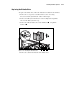
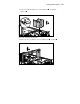
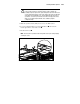
3. Remove the CPU fan basket. Loosen the thumbscrew and pull the
basket out
.
2
1
Figure 2-18. Removing the CPU fan basket
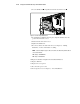
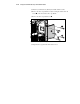
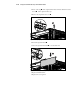
4. Remove the drive air baffle. Loosen two thumbscrews and lift out .
2
1
1
Figure 2-19. Removing the drive air baffle