
Compaq ProLiant ML530 Setup and Installation Guide

2-18 Compaq ProLiant ML530 Setup and Installation Guide
Compaq Confidential – Need to Know Required
Writer: Tricia Acevedo Project: Compaq ProLiant ML530 Setup and Installation Guide Comments:
Part Number: 139006-002 File Name: c-ch2 Installing Hardware.doc Last Saved On: 6/13/00 12:29 PM
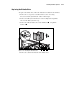
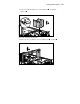
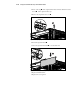
5. Loosen thumbscrew and pull out toward the back of the server .
1
2
Figure 2-16. Removing a diskette drive
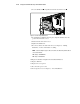
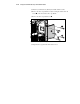
6. To install the new diskette drive into place, align the diskette drive into
position from inside the server.
7. Push toward the front of the server.
8. Tighten the thumbscrew.
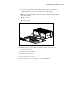
9. Reconnect cables to the back of the drive. See Chapter 5, “Cabling
Guidelines,” for more information on cabling.
NOTE: To aid in locating the proper cable connections, the cables and system board are
color coded as follows:
■ Orange = CD-ROM Drive
■ Purple = Diskette Drive
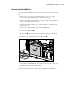
10. Replace fan basket and tighten the fan basket thumbscrew.
11. Replace CPU fan.
12. Replace the access panel.
13. Reconnect the power cords.
14. Power up the server. See Chapter 3, “Server Installation.”