
Compaq ProLiant ML530 Setup and Installation Guide

2-16 Compaq ProLiant ML530 Setup and Installation Guide
Compaq Confidential – Need to Know Required
Writer: Tricia Acevedo Project: Compaq ProLiant ML530 Setup and Installation Guide Comments:
Part Number: 139006-002 File Name: c-ch2 Installing Hardware.doc Last Saved On: 6/13/00 12:29 PM
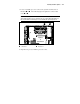
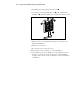
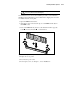
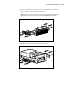
5. Align the removable media device into position from the front of the
server.
Figure 2-14. Installing a removable media device such as a DLT
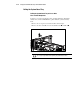
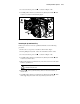
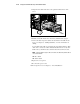
6. Push the removable media drive into the bay until the latch engages.
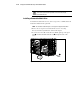
7. Connect the data and power cables to the back of the removable media
device. See Chapter 5, “Cabling Guidelines,” for more information on
cabling.
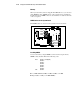
A removable media cable is provided in the removable media bays. This
cable can be connected to either embedded SCSI channel or to any other
SCSI or array controller. It also can be left disconnected if not needed.
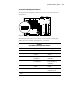
NOTE: To aid in locating the proper cable connections, the cables and system board are
color coded as follows:
■ Blue = SCSI A
■ Yellow = SCSI B
8. Replace the access panel.
9. Reconnect the power cords.
10. Power up the server. See Chapter 3, “Server Installation.”