
Compaq ProLiant ML530 Setup and Installation Guide

2-14 Compaq ProLiant ML530 Setup and Installation Guide
Compaq Confidential – Need to Know Required
Writer: Tricia Acevedo Project: Compaq ProLiant ML530 Setup and Installation Guide Comments:
Part Number: 139006-002 File Name: c-ch2 Installing Hardware.doc Last Saved On: 6/13/00 12:29 PM
WARNING: To reduce the risk of personal injury or damage to the equipment,
do not use the system board tray handle to lift or move the Compaq
ProLiant ML530 Server.
Installing a Removable Media Drive
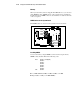
To install removable media devices, such as a tape drive or a DLT, follow the
instructions included in the option kit.
NOTE: The removable media drive bay does not support hot-plug SCSI hard drives.
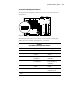
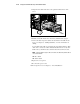
1. Remove the access panel, as described in the section “Accessing
Processors and the System Board” earlier in this chapter.
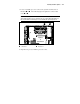
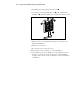
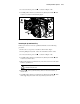
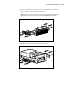
2. To remove the removable media drive bay blanks, push up on the green
latch
and slide the blank with rails out through the front of the
server.
2
1
Figure 2-11. Removing a removable media drive bay blank