
Compaq ProLiant ML530 Setup and Installation Guide

Installing Hardware Options 2-11
Compaq Confidential – Need to Know Required
Writer: Tricia Acevedo Project: Compaq ProLiant ML530 Setup and Installation Guide Comments:
Part Number: 139006-002 File Name: c-ch2 Installing Hardware.doc Last Saved On: 6/13/00 12:29 PM
CAUTION: Use only Compaq-approved DIMMs. Using DIMM modules from other
sources may adversely affect data integrity.
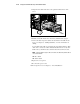
For an illustrated overview of the installation procedure, see the Hardware
Installation and Configuration poster included in the shipping box and on the
hood label under the access panel.
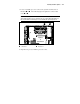
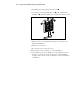
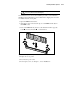
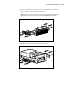
1. Open the DIMM socket latches.
2. Align the key slots on the bottom edge of each DIMM with the tabs in
the DIMM socket.
3. Insert each DIMM directly into the socket until the module is properly
seated
and close the latches , as shown below.
2
2
1
Figure 2-8. Installing and latching DIMMs
4. Replace the access panel.
5. Reconnect the power cords.
6. Power up the server. See Chapter 3, “Server Installation.”