
Compaq ProLiant ML530 Setup and Installation Guide

Installing Hardware Options 2-9
Compaq Confidential – Need to Know Required
Writer: Tricia Acevedo Project: Compaq ProLiant ML530 Setup and Installation Guide Comments:
Part Number: 139006-002 File Name: c-ch2 Installing Hardware.doc Last Saved On: 6/13/00 12:29 PM
System Board Configuration Switches
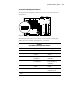
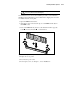
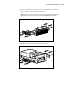
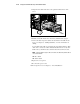
The system board configuration switches are located on the system board as
shown below.
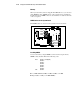
on
1 23456
Figure 2-6. Locating system board configuration switches
The following table defines the six switches on the system board. The Open
(Off) position is the default configuration for each switch.
Table 2-1
System Board Configuration Switches
Switch Open (Off) Position Closed (On) Position
1. Video Enable integrated video Disable integrated video
2. Lock configuration Configuration can be
changed
Configuration cannot be
changed
3. Rack mount System is tower
configuration
System is rack mount
configuration
4. Diskette boot override Diskette boot is controlled
by configuration
Diskette is enabled for
booting regardless of
configuration
5. Password enable Power on password is
enabled
Power on password is
disabled
6. Maintenance* NV RAM is valid NV RAM is invalidated,
configuration is lost
*See the ProLiant ML530 Service and Maintenance Guide for information on the use of this
switch.