
Compaq ProLiant ML530 Setup and Installation Guide

2-8 Compaq ProLiant ML530 Setup and Installation Guide
Compaq Confidential – Need to Know Required
Writer: Tricia Acevedo Project: Compaq ProLiant ML530 Setup and Installation Guide Comments:
Part Number: 139006-002 File Name: c-ch2 Installing Hardware.doc Last Saved On: 6/13/00 12:29 PM
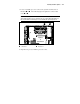
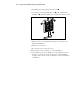
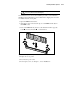
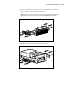
5. Install the processor by pushing it into the socket .
6. Secure the processor by pushing the levers down and turning the
thumbscrew
, tightening until the processor fully seats into the socket.
1
2
2
3
Figure 2-5. Installing the processor
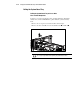
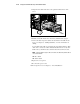
7. Replace the processor air baffle. Press the pop rivets into place and
tighten the thumbscrew.
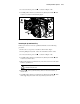
8. Replace the access panel.
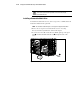
9. Reconnect the power cords to the server.
10. Power up the server. See Chapter 3, “Server Installation.”
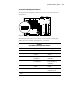
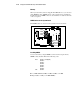
11. Verify that the processor was installed correctly. Check the processor
frequency, cache size, and socket location by reviewing the POST
messages on the system console. See Chapter 4, “Server Configuration
and Utilities.”