
Compaq ProLiant ML530 Setup and Installation Guide

2-6 Compaq ProLiant ML530 Setup and Installation Guide
Compaq Confidential – Need to Know Required
Writer: Tricia Acevedo Project: Compaq ProLiant ML530 Setup and Installation Guide Comments:
Part Number: 139006-002 File Name: c-ch2 Installing Hardware.doc Last Saved On: 6/13/00 12:29 PM
Installing the Processor
62 kg
137 lb
WARNING: This product is very heavy. To reduce the risk of
personal injury or damage to the equipment:
■ Remove all pluggable power supplies and modules to reduce
the weight of the product before lifting it.
■ Observe local occupational health and safety requirements and
guidelines for manual material handling.
■ Get help to lift and stabilize the product.
CAUTION: Be sure to lock the casters and have the access panel in place
before turning or reorienting the server position.
NOTE: To allow easier access to the ProLiant ML530 tower model, you may reorient the
server to a rack position, placing the server on the side opposite the access panel. The
following figures show the server in the rack model orientation.
The ProLiant ML530 server ships with at least one processor installed and is
capable of supporting up to two processors. To install a processor, follow the
instructions included in the processor option kit.
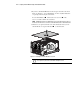
1. Remove the processor air baffle as shown below. Loosen the
thumbscrew
and pull up on pop rivets .
2. Lift the processor air baffle out of the server .
1
2
3
Figure 2-3. Removing the processor air baffle.