
Compaq ProLiant ML530 Setup and Installation Guide

2-4 Compaq ProLiant ML530 Setup and Installation Guide
Compaq Confidential – Need to Know Required
Writer: Tricia Acevedo Project: Compaq ProLiant ML530 Setup and Installation Guide Comments:
Part Number: 139006-002 File Name: c-ch2 Installing Hardware.doc Last Saved On: 6/13/00 12:29 PM
8. If you have a ProLiant ML530 tower model, open and remove the front
bezel. See Chapter 3, “Server Installation,” for more detailed instruction
on opening and removing the tower bezel.
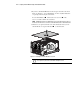
Loosen the thumbscrews and the tooled-access screw on the
server cover with a Torx T-15 screwdriver.
NOTE: A TORX allen wrench is included with the server and is attached on the back of
the unit. Use this wrench to loosen most screws and thumbscrews on the ML530 server.
9. Slide the access panel toward the rear of the unit about 1 inch (2.5 cm)
and then lift the access panel off the unit
, as shown below.
3
2
1
1
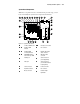
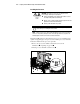
Figure 2-1. Removing the ProLiant ML530 access panel
CAUTION: To reduce the risk of damage to the equipment, make sure the
access panel is in place and secured before moving the server.