
Compaq ProLiant ML530 Setup and Installation Guide
Index 5
Compaq Confidential – Need to Know Required
Writer: Tricia Acevedo Project: Compaq ProLiant ML530 Setup and Installation Guide Comments:
Part Number: 139006-002 File Name: j-index.doc Last Saved On: 6/26/00 1:16 PM
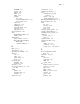
CD-ROM 2-19
control 1-11
diskette 2-17
failed 2-28
failure 2-28
hot-plug
fan 2-44
fan status LED indicator 2-43
fans, locating 2-42
online C-4
online spare 2-28
rebuilding C-4
removable media 2-15
removing 2-28
replacement 2-28
drive hot-plug fan 2-42
driver
Gigabit Ethernet NIC 4-17
loading 4-10
dual channel
SCSI controller 1-5, 5-6
Wide Ultra2 SCSI and Wide
Ultra3 SCSI
controller cabling 5-9
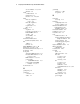
E
ECC 1-1, 1-3
edge brackets 3-12
edge brackets, attaching 3-24
electrical
code 3-3
outlet 3-11
power ratings 3-3
shock 3-34
electromagnetic
immunity A-4
interference A-4
electronics 3-34
electrostatic discharge 2-3, 2-12,
3-6, B-1
enable
diskette 2-9
integrated video 2-9
password 2-9
engage fan 2-41
environment 3-1, 3-2
equipment, grounding 3-3
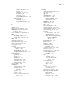
error
checking and correcting
memory 1-1
message 2-28, 4-19
system configuration 4-17
Ethernet/Token Ring Adapter 4-14
European union notice A-4
event
list 4-19
messages 4-20
types 4-20
view 4-18
examine required switches 4-5
examples, SCSI cabling 5-9
expanding storage capacity 1-5
expansion
boards 2-26, 3-1
slots 1-4
expansion board 2-26
expansion slot latch 2-26
external
cabling 5-3, 5-8
connectors 3-33, 5-3
storage device 2-24, 5-4, 5-5
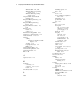
F
factory configuration, SCSI
drives 5-9
failed drive 2-28, C-3
failure
alert C-4
component 4-17
LED C-5
system 1-10
fan
basket, removing 2-17, 2-21
connector 2-5, 2-41
failed 2-43
failure 4-20
LED 2-38, C-2, C-7, C-8
optional 1-6
power 2-43
problem 2-38