
Compaq ProLiant ML530 Setup and Installation Guide

C-8 Compaq ProLiant ML530 Setup and Installation Guide
Compaq Confidential – Need to Know Required
Writer: Tricia Acevedo Project: Compaq ProLiant ML530 Setup and Installation Guide Comments:
Part Number: 139006-002 File Name: i-appc Status LED Indicators.doc Last Saved On: 7/18/00 1:52 PM
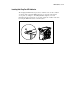
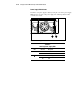
The drive fans LED indicators are viewed by removing the access panel and
pulling the system board tray back. See Chapter 2, “Installing Hardware
Options,” for more information about removing the access panel and pulling
the system board tray. Verify the condition of the fans by noting the LED
indicators at each fan location.
1
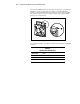
Figure C-6. Locating hot-plug drive fan LED indicators
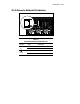
See the following table to determine the status of the hot-plug fan status LED
indicators.
Table C-5
Hot-Plug Fan LED Indicators
LED Indication Status
No light Power is not applied to the fan
Green light Power is applied to the fan and fan is functional
Amber light Fan has failed