
Compaq ProLiant ML530 Setup and Installation Guide

C-6 Compaq ProLiant ML530 Setup and Installation Guide
Compaq Confidential – Need to Know Required
Writer: Tricia Acevedo Project: Compaq ProLiant ML530 Setup and Installation Guide Comments:
Part Number: 139006-002 File Name: i-appc Status LED Indicators.doc Last Saved On: 6/12/00 2:25 PM
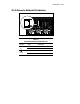
Hot-Plug Fan Diagnostic LED Indicators
For an understanding of the front panel fan LED indicator, refer to the section,
“Front Panel Diagnostic LED Indicators,” earlier in this appendix.
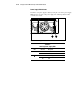
Front Panel Fan Diagnostic LED Indicator
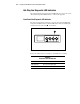
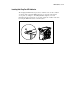
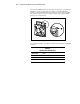
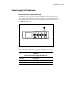
Fan status is determined by noting the color of the front panel fan LED. The
front panel fan LED indicator is the third LED left of the Power On/Standby
switch on the front of the server,
shown below.
1
Figure C-4. Front panel fan status LED indicator
Refer to the table below for a description of the LED color’s meaning.
Table C-4
Front Panel Fan LED Indicator
LED Status Description
Amber/Flashing One or more fans have failed
Off Fans are OK