
Compaq ProLiant ML530 Setup and Installation Guide

LED Indicators C-5
Compaq Confidential – Need to Know Required
Writer: Tricia Acevedo Project: Compaq ProLiant ML530 Setup and Installation Guide Comments:
Part Number: 139006-002 File Name: i-appc Status LED Indicators.doc Last Saved On: 6/12/00 2:25 PM
Internal Failure LED Indicators
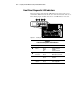
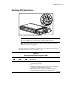
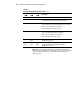
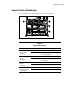
For an understanding of internal LED indicators, refer to Table C-3.
21
3
4
Figure C-3. Locating internal LED indicators
Table C-3
Internal LED Indicators
Indicators Status Means
Off All installed memory modules OK.
LEDs
Memory Module
(quantity 8)
On (Amber) Indicated memory module has failed, or
is not seated properly.
Off All installed processors OK.
LEDs
Processor
(quantity 2)
On (Amber) Indicated processor has failed, or is not
seated properly.
Green Indicated fan is operational.
LEDs
Drive Fan
(quantity 3)
Amber Indicated fan has failed.
Green Indicated fan is operational.
LEDs
System (CPU and I/O)
Fan (quantity 4)
Amber Indicated fan has failed.