
Compaq ProLiant ML530 Setup and Installation Guide

5-6 Compaq ProLiant ML530 Setup and Installation Guide
Compaq Confidential – Need to Know Required
Writer: Tricia Acevedo Project: Compaq ProLiant ML530 Setup and Installation Guide Comments:
Part Number: 139006-002 File Name: f-ch5 Cabling Guide.doc Last Saved On: 6/12/00 1:19 PM
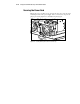
Internal Cabling with Integrated
Controller or Additional SCSI Adapter
IMPORTANT: Remove all SCSI cables from the integrated dual-channel SCSI controller if
the controller is not used to control any internal SCSI devices. Leaving these cables
connected to an internal SCSI bus could interfere with proper SCSI bus termination.
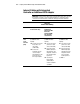
Table 5-1
Internal SCSI Cabling
Controller Hot-Plug SCSI Hard Drives
in Internal Drive Cage
2/4 DAT Drive;
4/8 DAT Drive;
Internal TurboDAT
Autoloader;
8X SCSI CD-ROM;
4/16 TurboDAT;
15/30 DLT Drive
35/70 DLT Drive
Integrated
SCSI
Port A
Controller
(Blue)
Shipping configuration
(no additional cables
required):
■ Use 40” point-to-point
68-pin, blue color
coded cable
(155072-001)
■ Connect from
integrated controller
connector A (blue
label indicator) to SCSI
Input connector on
drive cage backplane
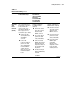
Shipping configuration
(no additional cables
required):
■ Use 2-device 68-pin,
yellow color coded
cable (157855-001)
■ Connect from SCSI
PORT A output (blue
label indicator) of the
integrated controller to
the removable media
bay devices.
■ Use 50-pin to
68-pin adapter
(199618-001) if
needed. See NOTE 1.
See NOTE 2.
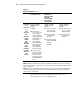
Shipping configuration
(no additional cables
required):
■ Use 2-device 68-pin,
yellow color coded
cable (157855-001)
■ Connect from SCSI
PORT A output (blue
label indicator) of the
integrated controller
to the removable
media bay devices.
See NOTE 2.
continued