
Compaq ProLiant ML530 Setup and Installation Guide

Cabling Guidelines 5-5
Compaq Confidential – Need to Know Required
Writer: Tricia Acevedo Project: Compaq ProLiant ML530 Setup and Installation Guide Comments:
Part Number: 139006-002 File Name: f-ch5 Cabling Guide.doc Last Saved On: 6/12/00 1:19 PM
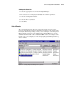
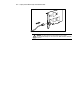
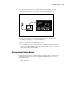
4. Connect the other end of the SCSI cable to the appropriate external
SCSI connector on the rear panel of the external storage device.
00
I
0
Figure 5-3. Connecting the external mass storage device
5. Reconnect the power cords if removed and take the computer out of
Standby. See Chapter 3, “Server Installation.”
6. Restore power to the external storage device.
7. To configure the device, run the System Configuration Utility. Refer to
the Server Setup and Management pack shipped with your server to run
the System Configuration Utility.
Determining Cabling Needs
For the latest information on SCSI adapters and Smart Array controllers and
configurations supported on the Compaq ProLiant ML530 server, see the
following website:
www.compaq.com