
Compaq ProLiant ML530 Setup and Installation Guide

Cabling Guidelines 5-3
Compaq Confidential – Need to Know Required
Writer: Tricia Acevedo Project: Compaq ProLiant ML530 Setup and Installation Guide Comments:
Part Number: 139006-002 File Name: f-ch5 Cabling Guide.doc Last Saved On: 6/12/00 1:19 PM
External Cabling
1
2
3
4
5
6
7 8 9
1011
876 5 4 3 2 1
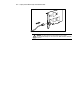
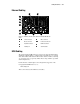
Figure 5-2. External connectors on the back of the ProLiant ML530 rack
server
-
Serial connectors Video connector
Mouse connector
-
Power cord connector
Keyboard connector Network connector
Parallel port SCSI knockouts
SCSI Cabling
The Compaq ProLiant ML530 server provides two integrated Wide Ultra2
SCSI buses. (This flexibility, combined with a maximum of seven optional
dual-channel Wide Ultra2 SCSI or Wide Ultra3 SCSI controllers, assuming
one expansion slot is occupied by a NIC, allows a large number of possible
SCSI configurations.)
For information on SCSI adapters and configurations supported on the
Compaq ProLiant ML530 server, see:
www.compaq.com
This section discusses the SCSI buses and cables.