
Compaq ProLiant ML530 Setup and Installation Guide
Compaq Confidential – Need to Know Required
Writer: Tricia Acevedo Project: Compaq ProLiant ML530 Setup and Installation Guide Comments:
Part Number: 139006-002 File Name: f-ch5 Cabling Guide.doc Last Saved On: 6/12/00 1:19 PM
Chapter 5
Cabling Guidelines
This chapter discusses connections and cabling considerations for the Compaq
ProLiant ML530 server. Connectors, guidelines, and cabling examples are
presented.
Network Interface Controller (NIC)
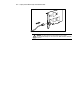
Connecting the Network Cables
Connect a single network cable to each port of the NIC:
■ For 100BASE-TX, your network cable must be category 5, twisted-pair
wiring. If you plan to run the NIC at 100 Mbps, it must be connected to
a 100BASE-TX hub or switch (not a 100BASE-T4 hub).
■ For 10BASE-T, use category 3, 4, or 5, twisted-pair wiring. If you want
to use this NIC in a residential environment, you must use a category 5
cable.