
Compaq ProLiant ML530 Setup and Installation Guide

Server Configuration and Utilities 4-19
Compaq Confidential – Need to Know Required
Writer: Tricia Acevedo Project: Compaq ProLiant ML530 Setup and Installation Guide Comments:
Part Number: 139006-002 File Name: e-ch4 Configuration and Utilities.doc Last Saved On: 6/12/00 4:14 PM
Printing the Event List
1. Select the appropriate server from the Insight Manager.
2. The selected server is displayed with buttons around its perimeter.
3. Select the Configuration button.
4. Select the Recovery button.
5. Select Print.
List of Events
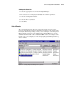
The event list displays the affected components and the associated error
messages. Though the same basic information is displayed, the format of the
list may be different depending on how you are viewing it: on the Integrated
Management Log Viewer, from within Compaq Insight Manager, or from
within the Windows NT or Novel NetWare IML viewers. An example of the
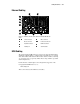
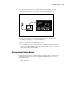
format of an event as displayed on the Compaq Integrated Management Log
Viewer follows:
Figure 4-2. Compaq Integrated Management Log Viewer