
Compaq ProLiant ML530 Setup and Installation Guide

4-2 Compaq ProLiant ML530 Setup and Installation Guide
Compaq Confidential – Need to Know Required
Writer: Tricia Acevedo Project: Compaq ProLiant ML530 Setup and Installation Guide Comments:
Part Number: 139006-002 File Name: e-ch4 Configuration and Utilities.doc Last Saved On: 6/12/00 4:14 PM
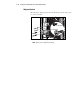
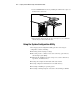
2. Set the CD-ROM disk into the tray, handling the CD from the edges, not
the flat surfaces of the disc.
Figure 4-1. Inserting the CD-ROM into the tray
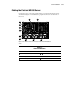
3. When the busy indicator lights, the drive is ready to receive commands
and data may be retrieved from the disc.
Using the System Configuration Utility
The Compaq System Configuration Utility performs a wide range of
configuration activities, including:
■ Providing switch and jumper settings
■ Resolving resource conflicts in areas such as memory, port addresses,
and interrupt requests (IRQ)
■ Managing the installation of mass storage devices such as hard drives,
tape drives, and diskette drives
■ Setting and storing Power-On features like date and time
■ Storing configuration information in nonvolatile memory
■ Assisting in installing an operating system
■ Assisting in running diagnostic tools such as Test and Inspect Utilities