
Compaq ProLiant ML530 Setup and Installation Guide

Server Installation 3-33
Compaq Confidential – Need to Know Required
Writer: Tricia Acevedo Project: Compaq ProLiant ML530 Setup and Installation Guide Comments:
Part Number: 139006-002 File Name: d-ch3 Installation.doc Last Saved On: 6/15/00 9:02 AM
Cabling the ProLiant ML530 Server
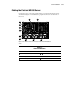
Connect the power cords and peripheral devices such as the keyboard, mouse,
and monitor. Figure 3-25 identifies the peripheral connectors on the back of
the server.
1
2
3
4
5
6
7 8 9
1011
876 5 4 3 2 1
Figure 3-25. External connectors on the back of the ProLiant ML530 rack
server
Table 3-3
External Connectors
-
Serial connectors Video connector
Mouse connector
-
Power cord connector
Keyboard connector Network connector
Parallel port SCSI knockouts