
ProLiant ML530 Generation 2 Server Setup and Installation Guide

Installing Hardware Options
HP ProLiant ML530 Generation 2 Server Setup and Installation Guide 3-41
HP CONFIDENTIAL
Writer: Richard O. Heath File Name: d-ch3 Installing Hardware Options.doc
Codename: Seattle Slew Part Number: 225579-002 Last Saved On: 1/8/03 3:00 PM
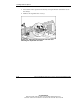
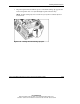
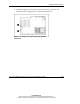
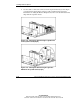
10. Close the PCI retaining clip (for full-length expansion boards only).
Figure 3-32: Securing the PCI retaining clip
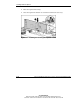
NOTE: If you are installing a Remote Insight board, you must cable the expansion board
to the system board. See “Remote Insight Board” in this chapter.
11. Install the access panel.
12. Install the server. See Chapter 5, “Installing the Rack Server” or Chapter 6,
“Installing the Tower Server.”
13. Cable the server. See Chapter 7, “Cabling the Server.”
14. Power up the server. See Chapter 8, “Server Configuration and Utilities.”
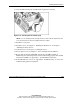
15. Be sure that the internal health LED on the front panel LED assembly is
illuminated green, indicating that the system is functioning properly. For detailed
information on LEDs, see Appendix C, “System LEDs and Switches.”
16. If the LED indicates an error, see Appendix D, “Troubleshooting,” or refer to the
troubleshooting guide for instructions.