
ProLiant ML530 Generation 2 Server Setup and Installation Guide

Installing Hardware Options
HP ProLiant ML530 Generation 2 Server Setup and Installation Guide 3-35
HP CONFIDENTIAL
Writer: Richard O. Heath File Name: d-ch3 Installing Hardware Options.doc
Codename: Seattle Slew Part Number: 225579-002 Last Saved On: 1/8/03 3:00 PM
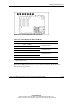
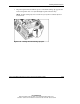
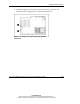
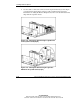
Figure 3-27: PCI-X expansion slots and buses
Table 3-7: PCI-X Expansion Slots and Buses
Item Slot
1 Slot 1 (hot-plug)
2 Slot 2 (hot-plug)
Shared PCI-X bus
3 Slot 3 (hot-plug)
4 Slot 4 (hot-plug)
Shared PCI-X bus
5 Slot 5
6 Slot 6
Shared PCI-X bus
7 Slot 7 PCI-X bus
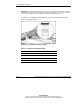
Note: Slot 7 is recommended for the Remote Insight board due to internal
cabling requirements.
The ProLiant ML530 Generation 2 server facilitates load balancing by having no
more than two slots per bus.