
ProLiant ML530 Generation 2 Server Setup and Installation Guide

Installing Hardware Options
3-28 HP ProLiant ML530 Generation 2 Server Setup and Installation Guide
HP CONFIDENTIAL
Writer: Richard O. Heath File Name: d-ch3 Installing Hardware Options.doc
Codename: Seattle Slew Part Number: 225579-002 Last Saved On: 1/8/03 3:00 PM
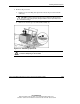
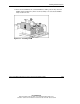
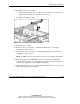
13. Lower the processor retaining bracket into position over the processor and
PPM (1) and secure it by tightening the thumbscrew (2).
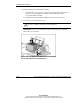
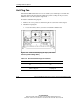
CAUTION: Before closing the processor retaining bracket, be sure that the
processor locking lever is closed. Forcing the bracket shut may damage
the processor or the processor socket.
Figure 3-22: Securing the processor retaining bracket
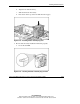
14. Repeat steps 7 through 13 to upgrade the second processor, if installed.
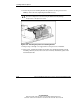
15. If necessary, reinstall the memory board. For more detailed information about
installing a memory board, refer to the server memory installation guide on the
Documentation CD.