
ProLiant ML530 Generation 2 Server Setup and Installation Guide

Installing Hardware Options
HP ProLiant ML530 Generation 2 Server Setup and Installation Guide 3-25
HP CONFIDENTIAL
Writer: Richard O. Heath File Name: d-ch3 Installing Hardware Options.doc
Codename: Seattle Slew Part Number: 225579-002 Last Saved On: 1/8/03 3:00 PM
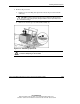
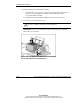
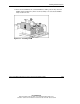
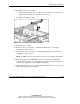
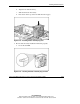
9. Remove the processors:
a. Lift the processor locking lever upward to release the processor from the
socket (1).
CAUTION: Failure to fully open the processor locking lever will prevent the
processor from seating properly during installation and can potentially lead to
hardware damage.
b. Remove the obsolete processor/heatsink assembly (2).
Figure 3-19: Removing a processor
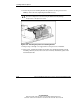
WARNING: Heatsinks may be hot. Allow processor/heatsink assemblies to
cool before attempting to remove them.