
ProLiant ML530 Generation 2 Server Setup and Installation Guide

Cabling the Server
HP ProLiant ML530 Generation 2 Server Setup and Installation Guide 7-9
HP CONFIDENTIAL
Writer: Richard O. Heath File Name: h-ch7 Cabling the Server.doc
Codename: Seattle Slew Part Number: 225579-002 Last Saved On: 1/8/03 3:19 PM
DVD Drive in the CD-ROM Drive Bay
HP ProLiant ML530 Generation 2 servers support mounting a DVD drive in the
CD-ROM drive bay in the front of the server.
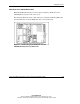
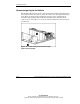
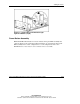
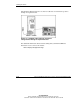
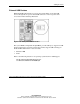
The following illustration shows cable routing for a terminated multi-drop IDE cable
from the DVD drive in the CD-ROM drive bay to the system board.
Figure 7-5: Cable routing of the DVD drive from the
CD-ROM drive bay to the system board