
ProLiant ML530 Generation 2 Server Setup and Installation Guide

Installing the Rack Server
HP ProLiant ML530 Generation 2 Server Setup and Installation Guide 5-15
HP CONFIDENTIAL
Writer: Richard O. Heath File Name: f-ch5 Installing the Rack Server.doc
Codename: Seattle Slew Part Number: 225579-002 Last Saved On: 1/8/03 3:17 PM
Installing the Server into the Rack
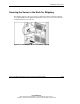
To complete the server rack installation:
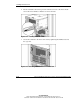
• Load the server into the rack rails.
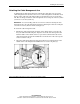
• Attach the cable management arm.
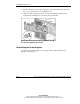
• Reinstall the power supplies.
Loading the Server into the Rack Rails
WARNING: The server is very heavy, up to 66 kg (146 lb). To reduce
the risk of personal injury or damage to the equipment:
• Remove all hot-plug power supplies to reduce the weight of the
server before lifting it.
• Observe local occupational health and safety requirements and
guidelines for material handling.
• Get help to lift and maneuver the server.
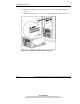
To load the server into the rack and secure it with the rack bezel thumbscrews:
1. Be sure that each rack rail assembly is perfectly aligned and securely installed in
the rack.