
ProLiant ML530 Generation 2 Server Setup and Installation Guide

Installing the Rack Server
HP ProLiant ML530 Generation 2 Server Setup and Installation Guide 5-13
HP CONFIDENTIAL
Writer: Richard O. Heath File Name: f-ch5 Installing the Rack Server.doc
Codename: Seattle Slew Part Number: 225579-002 Last Saved On: 1/8/03 3:17 PM
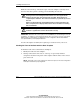
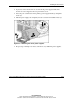
2. If present, remove the Torx T-15 screw from the power supply handle. The
Torx T-15 tool is clipped to the rear panel of the server.
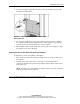
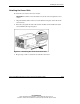
3. Press the port-colored latch on the primary power supply handle (1) and pull it
down (2).
4. Pull the power supply out completely and set it aside for reinstallation later (3).
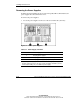
Figure 5-8: Removing the server power supplies
5. Repeat steps 2 through 4 to release and remove any additional power supplies.