
ProLiant ML530 Generation 2 Server Setup and Installation Guide
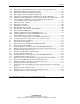
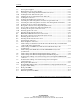
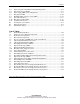
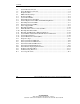

Contents
xii HP ProLiant ML530 Generation 2 Server Setup and Installation Guide
HP CONFIDENTIAL
Writer: Richard O. Heath File Name: a-frnt.doc
Codename: Seattle Slew Part Number: 225579-002 Last Saved On: 1/8/03 2:56 PM
5-7 Server power supplies .............................................................................................5-12
5-8 Removing the server power supplies.......................................................................5-13
5-9 Attaching a cable management arm bracket to the server .......................................5-14
5-10 Locking the inner slide rails into place ...................................................................5-16
5-11 Aligning the server rails with the inner slide rails...................................................5-17
5-12 Loading the rack server ...........................................................................................5-18
5-13 Securing the installed server in the rack..................................................................5-18
5-14 Attaching the cable management arm to the rear post of the rack ..........................5-19
5-15 Attaching the cable management arm to the cable management arm bracket.........5-20
5-16 Securing the server in the rack for shipping............................................................5-21
5-17 Rear panel connectors and components (rack server) .............................................5-23
5-18 Server cables secured to the cable management arm ..............................................5-24
5-19 Securing the AC power cord to the server...............................................................5-25
5-20 Powering up the rack server ....................................................................................5-26
5-21 Inserting the CD into the rack server.......................................................................5-28
6-1 HP ProLiant ML530 Generation 2 tower server .......................................................6-2
6-2 Rear panel connectors and components (tower server) .............................................6-4
6-3 Powering up the tower server....................................................................................6-6
6-4 Inserting the CD into the tower server ......................................................................6-8
7-1 System board connectors...........................................................................................7-3
7-2 Power backplane connectors .....................................................................................7-4
7-3 Cable routing of a SCSI device from the removable media bay to internal SCSI
connector B on the system board ..............................................................................7-7
7-4 Cable routing of an IDE device from the removable media bay to the
system board..............................................................................................................7-8
7-5 Cable routing of the DVD drive from the CD-ROM drive bay to the
system board..............................................................................................................7-9
7-6 Cable routing of the Remote Insight Lights-Out Pro (30-pin) ................................7-10
7-7 Cable routing of the Remote Insight Lights-Out Edition (16-pin) ..........................7-11
7-8 Standard cable routing of an external storage device through the VHDCI SCSI
connector .................................................................................................................7-13
7-9 Standard cable routing of an external storage device through an
expansion board.......................................................................................................7-14
7-10 Rear panel USB connectors.....................................................................................7-15
7-11 ProLiant ML530 Generation 2 server installed in a Compaq branded rack with
properly routed cabling ...........................................................................................7-17
C-1 Front panel LEDs ..................................................................................................... C-2
C-2 System board LEDs.................................................................................................. C-4
C-3 External expansion slot LEDs .................................................................................. C-5