
ProLiant ML530 Generation 2 Server Setup and Installation Guide

Installing Hardware Options
HP ProLiant ML530 Generation 2 Server Setup and Installation Guide 3-61
HP CONFIDENTIAL
Writer: Richard O. Heath File Name: d-ch3 Installing Hardware Options.doc
Codename: Seattle Slew Part Number: 225579-002 Last Saved On: 1/8/03 3:00 PM
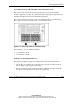
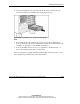
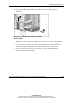
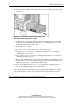
4. Lift the slate-blue release latch (1) and slide out a removable media bay
blank (2).
Figure 3-48: Removing the media bay blanks
(tower model)
NOTE: If you plan to install a full-height device, you must remove both media bay blanks.
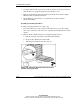
5. If you remove the lower removable media bay blank, remove the terminated
multi-drop SCSI cable bundled in the bay blank and store it for later use.
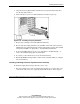
6. Locate and remove the Torx T-15 tool. See “Locating and Removing the
Torx T-15 Tool” in this chapter.