
ProLiant ML530 Generation 2 Memory Installation Guide

Memory
1-22 HP ProLiant ML530 Generation 2 Server Memory Installation Guide
HP CONFIDENTIAL
Writer: Wendy Wing File Name: b-ch1 Memory.doc
Codename: Seattle Slew Part Number: 279985-002 Last Saved On: 1/9/03 11:54 AM
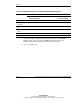
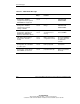
Table 1-8: Memory LED States on a Properly Configured Memory Board
Memory Configuration LED
Advanced ECC
(Standard) Memory
Online Spare Memory Single-Board
Mirrored Memory
Memory status Green Green Green
DIMM 1-8, if
populated
Green Green Green
“Online Spare”
text
Off Green Off
Online spare
status
Off Green Off
Mirroring status Off Off Green
Note: When the server is configured for online spare mode, bank D is the online spare bank.
7. If any of the LEDs is illuminated solid amber, indicating a failed DIMM, or
blinking amber, indicating improper DIMM configuration, refer to the
troubleshooting guide on the Documentation CD for instructions.
8. Close the hot-plug door.