
ProLiant ML530 Generation 2 Memory Installation Guide

Memory
HP ProLiant ML530 Generation 2 Server Memory Installation Guide 1-21
HP CONFIDENTIAL
Writer: Wendy Wing File Name: b-ch1 Memory.doc
Codename: Seattle Slew Part Number: 279985-002 Last Saved On: 1/9/03 11:54 AM
Installing a Memory Board
To install a memory board:
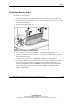
1. Align the memory board with the memory slot and memory board guide clips.
2. Slide the memory board into the server (1) and close the ejector levers to seat the
memory board firmly (2).
3. Engage the locking switch (3).
Figure 1-6: Installing a memory board
4. Power up the server. Refer to Chapter 5, “Installing the Rack Server” or
Chapter 6, “Installing the Tower Server,” in the setup and installation guide on
the Documentation CD.
5. Configure the memory. See “Configuring the Memory” in this chapter.
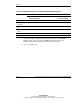
6. Look at the LEDs on the top of the memory board to be sure that the memory is
functioning properly. Table 1-8 describes what the LEDs look like for each
memory configuration when the DIMMs and memory board are installed and
functioning properly. For more information on LEDs, see “Memory Board
LEDs” in this chapter.