
ProLiant ML530 Generation 2 Memory Installation Guide

Memory
HP ProLiant ML530 Generation 2 Server Memory Installation Guide 1-9
HP CONFIDENTIAL
Writer: Wendy Wing File Name: b-ch1 Memory.doc
Codename: Seattle Slew Part Number: 279985-002 Last Saved On: 1/9/03 11:54 AM
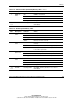
Table 1-4: Advanced ECC (Standard) Memory LEDs continued
Item Description Indicator Status
Off DIMM is not installed.
Green DIMM is installed.
Amber Memory error has occurred on this DIMM.
7 DIMM 1-8
status
Flashing amber Configuration error has occurred.
1-3,
6, 7
All LEDs Flashing amber CAUTION – Memory board is in use; relock it
immediately.
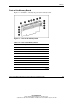
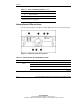
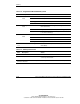
Table 1-5: Online Spare Memory LEDs
Item Description Indicator Status
Off Memory board is offline.
Green Memory board is online.
Flashing green Memory board is busy.
1 Memory
status
Amber Memory error has occurred.
Off Memory board is not configured for online spare
memory.
Green Online spare memory is functioning properly.
2 Online spare
status
Amber Memory error has occurred and system has failed over
to the online spare bank.
Off Bank is not configured as an online spare bank.
Green Bank is configured as an online spare bank.
6 “Online
Spare” text
Flashing green Failure has occurred and online spare bank is active.
Off DIMM is not installed.
Green DIMM is installed.
Amber Memory error has occurred on this DIMM.
7 DIMM 1-8
status
Flashing amber Configuration error has occurred.
1-3,
6, 7
All LEDs Flashing amber CAUTION – Memory board is in use; relock it
immediately.