
ProLiant ML530 Generation 2 Memory Installation Guide

Memory
1-4 HP ProLiant ML530 Generation 2 Server Memory Installation Guide
HP CONFIDENTIAL
Writer: Wendy Wing File Name: b-ch1 Memory.doc
Codename: Seattle Slew Part Number: 279985-002 Last Saved On: 1/9/03 11:54 AM
Memory Quick Start Guidelines
This section gives a brief overview of memory in the HP ProLiant ML530
Generation 2 servers, including:
• Quick start DIMM installation
• Quick start memory configuration
• Quick start LED information
More information about each of these items can be found in this chapter.
Quick Start DIMM Installation
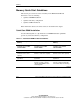
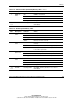
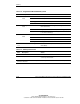
Use the following table as a quick reference for DIMM installation guidelines
specific to your desired memory configuration.
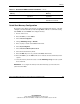
Table 1-1: Quick Start DIMM Installation Guidelines
Advanced ECC (Standard)
Memory
Online Spare Memory Single-Board Mirrored
Memory
Use only industry-standard
PC1600 registered DDR
SDRAM DIMMs.
Use only industry-standard
PC1600 registered DDR
SDRAM DIMMs.
Use only industry-standard
PC1600 registered DDR
SDRAM DIMMs.
Install DIMMs in pairs. Install DIMMs in pairs. Install DIMMs in pairs.
Be sure that both DIMMs in
a bank are of the same
capacity.
Be sure that both DIMMs in a
bank are of the same capacity.
Be sure that both DIMMs in a
bank are of the same capacity.
Be sure that bank A is
populated.
Be sure that bank A is
populated.
Be sure that bank A is
populated.
DIMMs in the online spare bank
must be of equal or greater
capacity than DIMMs in each
remaining bank.
DIMMs in the mirrored banks
must be configured identically
to the banks they are mirroring.
continued