
Microsoft Small Business Server 2000 Installation Instructions for Compaq Prosignia and ProLiant Servers

Microsoft Small Business Server 2000 Installation Instructions for Compaq Prosignia and ProLiant Servers 5
145Z-0301B-WWEN
provides two sets of instructions to obtain individual components or the complete CSP for
Windows 2000 bundle.
Using Compaq Server Download Center to Create Compaq Support Paq for
Microsoft Windows 2000 Components
If you use the Compaq Server Software Download Center to create Compaq Support Paq (CSP)
for Microsoft Windows 2000 components, refer to the procedures included in Table 5.
Note: The instructions provided in Table 5 detail procedures for creating the necessary storage
component. You may also want to extract the driver for your network interface controller (NIC) if
Microsoft SBS 2000 does not contain the base drivers for it. NIC drivers are accessible via the
Network category link presented in step 2.
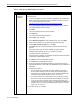
Table 5. Creating CSP for Windows 2000 components
√
Procedures Steps
Downloading and
creating CSP for
Windows 2000 Smart
Components from the
Compaq website
1. Go the Compaq Server Software Download Center by accessing this
URL: http://www.compaq.com/support/files/server/us/index.html.
2. Select your server(s) from the Family drop-down list box, select
Microsoft Windows 2000 from the Operating System drop-down list
box, and click the Go button.
This procedure takes you to the Locate page, listing the available
software by categories.
3. Click the Storage category link.
4. Select the Smart Component (driver) for the primary storage controller
used in your server by clicking the software version link listed in the
Current Version column next to the desired Smart Component.
This procedure takes you to the Download page, listing the
enhancements, fixes, and installation information.
5. Click the Download button to download the file.
6. Execute the appropriate storage component after the download
completes.
7. Select the option to Extract the driver to a temporary directory on your
server, and then close the Compaq Package Setup window. Go to this
temporary directory.
8. Execute the FLOPPY.BAT file to create the boot diskette containing
the appropriate driver files.
9. Return to the Compaq Server Software Download Center once the
Microsoft SBS 2000 installation completes and download the
complete CSP for Windows 2000 bundle onto your server by following
these steps:
a. Repeat step 2.
b. Click the Bundles (Drivers and Agents) category link.
c. Select the Compaq Support Paq for Microsoft Windows 2000
bundle by clicking the software version link listed in the Current
Version column next to the bundle name.
This procedure takes you to the Download page, listing the
enhancements, fixes, and installation information for all Smart
Components that comprise the CSP for Windows 2000 bundle.