
Microsoft Small Business Server 2000 Installation Instructions for Compaq Prosignia and ProLiant Servers

Microsoft Small Business Server 2000 Installation Instructions for Compaq Prosignia and ProLiant Servers 4
145Z-0301B-WWEN
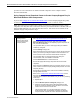
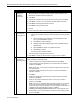
Table 2. Software requirements
√
Software
Microsoft SBS 2000
• 5 CD-ROMs
Compaq SmartStart and Support Software CD-ROM (supplied with the
Compaq server)
For Prosignia Server 720 or ProLiant 400 only:
Must use 11 May 1999 ROM or later for SmartStart 4.80 (or later) support.
This ROM image can be downloaded from the Compaq Server Software
Download Center, commonly known as the Compaq Support Software
website, (http://www.compaq.com/support/files/server/us/index.html).
Required Information
Table 3 lists additional information you need to know for the installation.
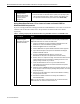
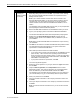
Table 3. Information required for installation
√
Information
Name of licensee for the Microsoft Small Business Server 2000 software
Name of your organization
Name of server
Name of domain
Product ID for the Microsoft SBS (see software packaging)
Additional Information
This section contains additional information about the installation.
Installing With or Without a Modem
The installation instructions contain information on installing Microsoft SBS 2000 for servers
configured with and without a modem.
Review Table 4 for additional minimum requirements if you plan to install the Microsoft SBS
2000 software on a Compaq Prosignia and ProLiant server with a modem. Refer to the Microsoft
SBS 2000 user documentation for the services that will be available with various modem types.
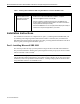
Table 4. Additional requirements if you have a modem
√
Additional Minimum Requirements
Driver for modem (supplied by the modem manufacturer)
Area code and phone number for telephone line(s) connected to modem(s)
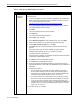
Required Components
Compaq Support Paq (CSP) for Microsoft Windows 2000, also referred to as the CSP for
Windows 2000, is required for the Microsoft SBS 2000 software installation. This section