
Microsoft Small Business Server 2000 Installation Instructions for Compaq Prosignia and ProLiant Servers

Microsoft Small Business Server 2000 Installation Instructions for Compaq Prosignia and ProLiant Servers 14
145Z-0301B-WWEN
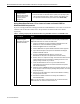
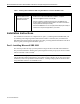
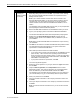
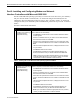
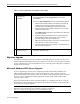
Table 10. Removing Exchange Internet Mail Connector (IMC)
√
Procedures Steps
Task 1:
Recording IMC
information
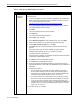
1. Open Microsoft Exchange Administrator.
2. Expand Servername, expand Configuration, and then click
Connections.
3. Double-click Internet Mail Service, and record the following settings:
• Determine if the message delivery uses DNS or if it forwards all
messages to the host by reviewing the information on the
Connections tab. If the latter applies, record the host name.
• Establish if the dial using checkbox is selected. If so, write down
the connection being used.
• Click E-Mail Domain under Specify by E-Mail domain. Make note
of the domains listed.
• Write down the dial-up schedule and the information displayed
under Mail Retrieval and Logon Information on the Dial-Up
Connections tab (for dial-up connections only).
• Make note of the domains listed under routing on the Routing tab.
This is typically your external domain name.
• Write down the entry listed under Address on the Address space
tab. This is typically listed as *.
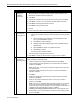
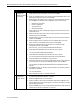
Task 2:
Removing the IMC
1. Delete the connection named Internet Mail Service after recording the
information obtained in Task 1.
Migration Upgrade
The migration upgrade involves the installation of Small Business Server 2000 on a new server
and the migration of Small Business Server 4.5 data to this new server. For this option, follow the
process outlined in the Microsoft Small Business Server 2000 Migration white paper, available on
the Microsoft.com website.
Microsoft Windows 2000 Server Upgrade
If you are upgrading an existing server configured with Microsoft Windows 2000 Server to
Microsoft SBS 2000 and the server contains an ATI Rage IIC Video Controller, you must
determine the media used to install its video driver. Remove any ATI Rage IIC Video Controller
Driver previously installed from Compaq Support Paq (CSP) for Microsoft Windows 2000
Versions 5.04A or 5.08A
Instead, use either the driver found on the base media or use a standard VGA driver. Using the
ATI Rage IIC Video Controller Driver from the CSP for Microsoft Windows 2000 product may
cause video loss during the upgrade.
Note: Once the install or upgrade of SBS 2000 completes, you can reinstall the updated ATI
Rage IIC Video Controller Driver provided by Compaq on the Web at
http://www.compaq.com/support/files/server/us/locate/2011.html.