
Microsoft BackOffice Small Business Server 4.5 Installation Instructions for Compaq Prosignia and ProLiant Servers

Microsoft BackOffice Small Business Server 4.5 Installation Instructions for Compaq Prosignia and ProLiant Servers 8
13J6-1000A-WWEN
Using SmartStart Release 4.22 or Earlier
If you use Compaq SmartStart and Support Software CD Release 4.22 or earlier to create the
Compaq SSD for Windows NT 4.0 diskettes, refer to the procedures included in Table 6.
Note: Use the following procedures for Prosignia Server 720 and ProLiant 400 only.
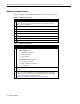
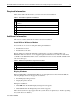
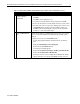
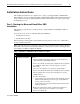
Table 6. Creating SSD for Windows NT 4.0 diskettes using an earlier version of SmartStart
√
√√
√
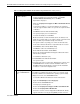
Procedures Steps
!
Booting the Compaq
SmartStart and Support
Software CD
1. Insert the Compaq SmartStart and Support Software CD into the CD-
ROM drive.
2. When the first interactive window appears, select your language
preference.
The Regional Settings window appears.
3. Click Next.
The System Settings Summary window appears.
4. Click Continue.
The License Agreement window appears.
5. Click I Agree. Then, click OK.
The system prompts you to insert the SmartStart Server Profile
diskette.
6. Insert the SmartStart Server Profile diskette.
7. Click OK.
The System Utilities window appears.
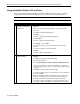
!
Creating support
software diskettes
1. From the System Utilities window, double-click Create Support
Software.
2. Click OK to launch the Diskette Builder Utility.
3. Expand the Compaq tree.
4. Select Compaq Support Software for Microsoft Windows NT 4.0.
Look under Description to see how many diskettes are required to
create the support software. Make sure you have the required number
of diskettes.
5. Click Next to launch the Diskette Builder Utility.
6. Insert the first diskette after the system prompts you to insert diskette
#1. Then, click OK.
Note: If the diskette contains information (that is, the diskette is not
blank), the system prompts you to verify the deletion of this data.
Click Yes to overwrite any information already on the diskette.
The system continues to prompt you to remove the diskette and to
insert another diskette until all of the required diskettes are created.
continued