
Microsoft BackOffice Small Business Server 4.5 Installation Instructions for Compaq Prosignia and ProLiant Servers

Microsoft BackOffice Small Business Server 4.5 Installation Instructions for Compaq Prosignia and ProLiant Servers 5
13J6-1000A-WWEN
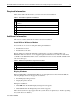
Required Information
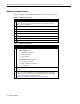
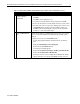
Table 3 lists additional information you need to know for the installation.
Table 3. Information required for installation
√
√√
√
Information
!
Name of licensee for the Microsoft BackOffice Small Business Server 4.5
software
!
Name of your organization
!
Name of server
!
Name of domain
!
Product ID for the Microsoft BackOffice SBS (see software packaging)
Additional Information
This section contains additional information about the installation.
Install With or Without a Modem
You can follow one of two modem paths during the installation:
• Install with a modem
• Install without a modem
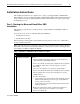
Review Table 4 for additional minimum requirements if you plan to install the Microsoft
BackOffice SBS 4.5 software on a Compaq Prosignia and ProLiant server with a modem. Refer
to the Microsoft BackOffice SBS 4.5 user documentation for the services that will available with
various modem types.
Table 4. Additional requirements if you have a modem
√
√√
√
Additional Minimum Requirements
!
Driver for modem (supplied by the modem manufacturer)
!
Area code and phone number for telephone line(s) connected to modem(s)
Display Windows
When installing Microsoft BackOffice SBS 4.5 on a Prosignia Server 720 or ProLiant 400, the
following Display windows may appear several times:
• Invalid Display Settings window
• Display Properties window
During the installation:
• Click OK when the Invalid Display Settings window appears.
• Click Cancel when the Display Properties window appears.
These windows will no longer appear after the system drivers are updated (see “Task 8: Updating
the system drivers” in Table 8).