
Microsoft BackOffice Small Business Server 4.5 Installation Instructions for Compaq Prosignia and ProLiant Servers

Microsoft BackOffice Small Business Server 4.5 Installation Instructions for Compaq Prosignia and ProLiant Servers 21
13J6-1000A-WWEN
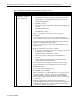
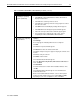
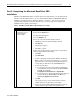
Table 8. Final Microsoft BackOffice SBS installation procedures (continued)
√
√√
√
Procedures Steps
!
Task 9:
Completing the final
steps
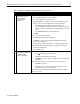
Note: After the system restarts, remember to change the Administrator
password, which was set to blank in Task 7. To change the password, see
the online Help for instructions.
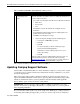
1. Select one of the following from the Welcome to Windows NT window:
• What’s New
• Help Contents
• Close
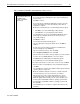
2. Click Close to exit from this window after reading the desired
information.
An Invalid Display Settings window appears, indicating that a new
graphics driver has been installed.
3. Click OK to acknowledge the message.
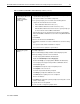
• Do the following if the Display Properties window appears:
# Set the pixels to 800 x 600 (or greater).
# Click Test.
# Click OK.
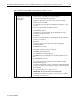
The system prompts you with the following message:
Did you see the test bitmap properly?
Click Yes if you saw the bitmap properly. If not, choose
another pixel setting.
# Click OK.
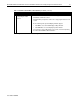
Note: This software requires an additional Microsoft Service Pack. You
can download the latest Service Pack from the Microsoft website
(http://www.microsoft.com/). You may also want to check this website for
additional upgrades to the individual BackOffice components.
This completes the Microsoft BackOffice SBS 4.5 installation.
Updating Compaq Support Software
After the Microsoft BackOffice SBS 4.5 software installation completes, you may want to update
your Compaq support software with the latest enhancements and fixes available for your system
from the Compaq website.
The Compaq Support Paq for Microsoft Windows NT 4.0, an advanced software delivery tool,
replaces the familiar SSD utility vehicle used for supporting Windows NT 4.0. The Support Paq
includes an installer that analyzes system requirements and automatically installs applicable
drivers, utilities, agents, and services based on this analysis.
IMPORTANT: The Compaq Support Paq for Microsoft Windows NT 4.0 does not create
diskettes. You should copy the Support Paq directly to a separate partition on your test platform
before beginning installation.
If you would rather install specific components (single driver, ROM, agent, or utility) instead of
downloading and installing the Support Paq, you can do so. These components are available as