
Microsoft BackOffice Small Business Server 4.5 Installation Instructions for Compaq Prosignia and ProLiant Servers

Microsoft BackOffice Small Business Server 4.5 Installation Instructions for Compaq Prosignia and ProLiant Servers 17
13J6-1000A-WWEN
Part 2: Completing the Microsoft BackOffice SBS
Installation
The Microsoft BackOffice SBS 4.5 software may incorrectly identify your onboard network
interface controller (NIC). Before you can continue with the Microsoft BackOffice SBS 4.5
installation, perform the steps in Task 6 in Table 8 to select the correct Compaq network
controller. The remainder of the table lists the steps you need to perform to complete the
installation and to update system drivers.
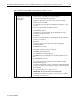
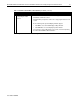
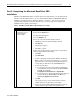
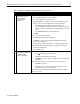
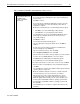
Table 8. Final Microsoft BackOffice SBS installation procedures
√
√√
√
Procedures Steps
!
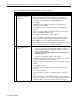
Task 6:
Selecting the correct
network interface
controller (NIC)
1. Select Start →
→→
→ Settings →
→→
→ Control Panel.
2. Double-click the Network icon.
The Network window appears.
3. Select the Adapters tab.
4. Remove the entry in the Network Adapters window:
• Highlight the entry in the Network Adapters window.
• Click Remove.
A warning box appears.
• Click Yes to continue.
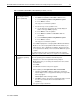
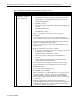
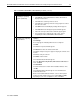
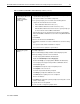
5. Add the correct network interface controller (from the appropriate
Compaq SSD for Windows NT diskette):
• Click Add.
• Click Have Disk.
• Insert the appropriate Compaq SSD for Windows NT diskette.
Note: To help you determine which diskette to use, locate the
appropriate driver on the Compaq SSD for Windows NT list of
contents that you obtained from the NTREADME.HLP file.
• Do one of the following:
" For Prosignia Server 720, ProLiant 400, ProLiant ML330,
ProLiant ML350, and ProLiant ML370, type A:\net\intelnic.
Click OK. Then, highlight
Compaq Ethernet/Fast Ethernet or Gigabit NICs.
" For Prosignia Server 740, ProLiant 800, ProLiant 1600, and
ProLiant 1850R, type A:\net\netflx3. Click OK. Then,
highlight Compaq NetFlex-3 Controller.
• Click OK.
The system copies the correct network interface controller
software driver from the diskette to your hard drive.
• Remove the Compaq SSD for Windows NT diskette when the
copying completes (green diskette drive light turns off).
continued