
Microsoft BackOffice Small Business Server 4.5 Installation Instructions for Compaq Prosignia and ProLiant Servers

Microsoft BackOffice Small Business Server 4.5 Installation Instructions for Compaq Prosignia and ProLiant Servers 13
13J6-1000A-WWEN
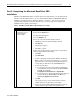
Table 7. Initial Microsoft BackOffice SBS installation procedures (continued)
√
√√
√
Procedures Steps
!
Task 3:
Installing the operating
system (continued)
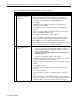
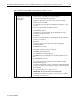
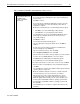
4. If no modem is installed:
• You may get a Setup Message window, displaying the following:
Remote Access is not configured with any ports. You have an
invalid RAS configuration.
• Click OK to continue.
• This message may be followed by an Error window, displaying the
following:
The network failed to start.
• Click Cancel to continue.
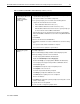
5. Set the correct date, time, and time zone when prompted.
6. Click Close.
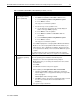
The setup program copies files. Then, the system automatically
restarts. After the system restarts, the following message may appear:
At least one service or driver failed during system setup. Use Event
Viewer to examine the Event log for details.
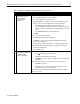
If this message appears, the system detected and loaded incorrect
network drivers.
Note: The following messages may also appear:
• If no modem is installed in the system, the following message may
be displayed for several minutes:
Please wait while the domain list is created.
• This message may be followed by the following Windows
message:
The full domain list cannot be generated at this time. Some
domains may be missing from the list.
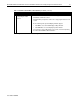
Then, a Welcome message appears informing you that the setup
program will upgrade your system Windows NT Service Pack 4.
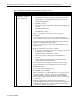
7. Click Next to continue.
A License Agreement window appears.
8. Click I Agree. Then, click Next.
9. When prompted for the 10-digit Small Business Server CD key, enter
the CD Key from the sticker on your CD. Then, press Next. (Later
during the installation, you will be prompted for a Microsoft Office
2000 or Microsoft Outlook 2000 CD, enter the CD key from the back
of the CD case.)
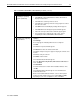
Note: An Installed Modems window may appear displaying an
Undetected Modem message (that is, the modem was not detected
correctly). If this appears, go to “Task 4: Installing and configuring
modem drivers.” Otherwise, go to Step 10.
continued