
Microsoft BackOffice Small Business Server 4.5 Installation Instructions for Compaq Prosignia and ProLiant Servers

Microsoft BackOffice Small Business Server 4.5 Installation Instructions for Compaq Prosignia and ProLiant Servers 12
13J6-1000A-WWEN
Table 7. Initial Microsoft BackOffice SBS installation procedures (continued)
√
√√
√
Procedures Steps
!
Task 2:
Choosing disk carving
options (continued)
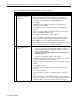
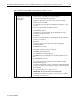
4. Do one of the following:
• Press Enter to install Microsoft BackOffice SBS 4.5. Then,
" Select Format the partition using NTFS file system.
" Press Enter to continue.
The setup process formats the partition.
• Press the C key to create a partition. Then,
" Use the backspace key to delete the currently displayed
number. Then, type 3000 (or greater).
" Press Enter to create the partition.
" Press Enter to install Microsoft BackOffice SBS 4.5
(on drive C:).
" Select Format the partition using NTFS file system.
" Press Enter to continue.
The setup process formats the partition.
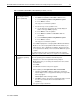
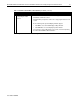
5. Press Enter if prompted for a Compaq SSD for Windows NT diskette.
Note: Use the same Compaq SSD for Windows NT diskette as you
did in Step 4 of “Task 1: Starting the installation.” After the files have
been copied from the diskette, remove the diskette before the system
restarts.
The setup program copies files to the hard drive. When the copying is
complete, the system restarts. This process requires no user intervention.
!
Task 3:
Installing the operating
system
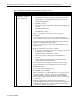
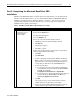
After the system restarts, the Microsoft BackOffice Small Business
Server 4.5 operating system installation automatically starts.
1. Supply licensee name and organization when prompted.
Note: At this point, you can change the default server name and the
default domain.
2. Press Next.
The Windows NT Server Setup screen appears.
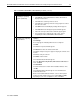
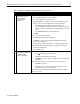
3. When installing on a Prosignia Server 720 or ProLiant 400:
• The Microsoft BackOffice SBS 4.5 setup begins searching for
network adapters and a setup parameter warning message similar
to this may appear:
DetectAdapters value is missing or invalid.
• Click OK to continue. (The missing or invalid value will be resolved
once the correct network drivers are installed later in the
installation.)
The system sets up network files.
continued