
HP ProLiant ML370 Generation 3 Setup and Installation Guide

Installing Hardware Options
3-54 HP ProLiant ML370 Generation 3 Server Setup and Installation Guide
HP CONFIDENTIAL
Writer: Jennifer Hayward File Name: d-ch03 Installing Hardware Options.doc
Codename: Dizzy Devil Part Number: 281992-002 Last Saved On: 12/3/02 12:45 PM
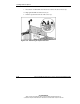
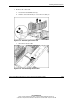
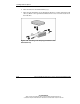
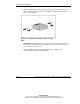
4. Remove the Torx T-15 screws from the bezel blank and attach them to the tape
drive as described in steps 4 and 5 in “Installing a Non-Hot-Plug SCSI Hard
Drive,” in this chapter.
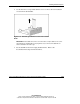
Figure 3-43: Attaching installation screws to a tape
drive
IMPORTANT: Each SCSI device in the server must have a unique address. The server
automatically sets all SCSI IDs for hot-plug drives, but you must set the SCSI IDs for
devices installed in the media cage.
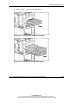
5. Set the SCSI ID for the non-hot-plug SCSI hard drive. Refer to the
documentation that ships with the hard drive.