
HP ProLiant ML370 Generation 3 Setup and Installation Guide

Installing Hardware Options
3-50 HP ProLiant ML370 Generation 3 Server Setup and Installation Guide
HP CONFIDENTIAL
Writer: Jennifer Hayward File Name: d-ch03 Installing Hardware Options.doc
Codename: Dizzy Devil Part Number: 281992-002 Last Saved On: 12/3/02 12:45 PM
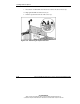
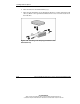
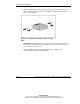
6. Insert the drive into the bezel blank tray (1).
7. Insert the four installation screws through the bezel tray cutouts and into the hard
drive (2). Refer to the option kit documentation for exact screw hole locations on
the hard drive.
Figure 3-40: Securing a non-hot-plug hard drive to the
bezel blank tray