
HP ProLiant ML370 Generation 3 Setup and Installation Guide

Installing Hardware Options
3-48 HP ProLiant ML370 Generation 3 Server Setup and Installation Guide
HP CONFIDENTIAL
Writer: Jennifer Hayward File Name: d-ch03 Installing Hardware Options.doc
Codename: Dizzy Devil Part Number: 281992-002 Last Saved On: 12/3/02 12:45 PM
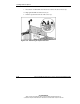
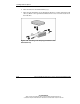
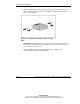
d. Lift the center wall out of the chassis.
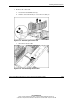
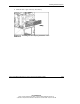
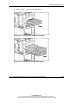
8. Locate the three-device SCSI cable tie-wrapped to the diskette drive, if you are
installing one or more of the following devices:
— Non-hot-plug SCSI hard drive
— Half-height media device
— Full-height media device
Installing a Non-Hot-Plug SCSI Hard Drive
You can install up to two half-height removable devices in the removable media
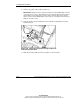
cage. To install a non-hot-plug SCSI hard drive:
1. Power down the server. Refer to “Powering Down the Server” in this chapter.
2. Remove the access panel. Refer to “Removing the Access Panel” in this chapter.
3. Access the removable media cage. Refer to “Accessing the Removable Media
Cage” in this chapter.
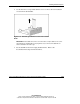
NOTE: HP recommends that you remove all bezel blanks to facilitate drive installation.